
Personal finance · Free Excel templates
Spreadsheets for the money decisions in your life.
Organize savings, education costs, workplace benefits and household decisions. Find a focused Excel file, see how it works and keep your own copy.
A record, a comparison or a plan?
Start with the question you need to answer. Each workbook has a specific job, not an all-in-one promise.
Available workbooks
See all published downloads →Free download · XLSX
Free CD Ladder Spreadsheet for Excel
Download a free CD ladder XLSX to track 200 CDs, separate principal from interest, and review maturity dates and renewal scenarios. Includes an Excel tutorial.
View the workbook →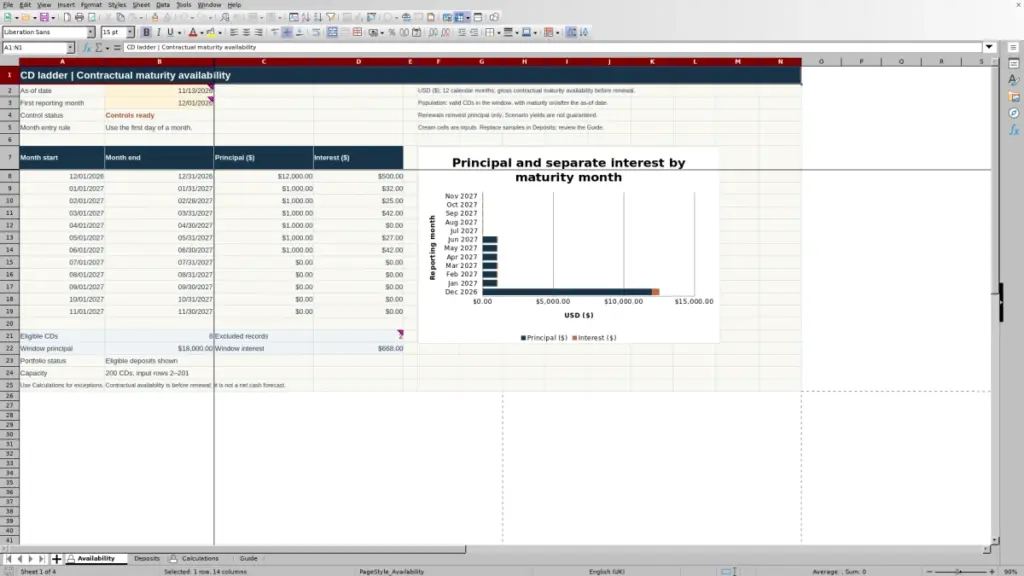
Choose by the job, not just the file name
Know when money is available
A savings balance and a maturity date answer different questions. Keep the amount, timing and assumptions together when planning access to cash.
Explore Savings →Keep education records connected
A payment, an expense and a withdrawal are separate events. Organize the documents behind them without treating a match as proof of tax eligibility.
Explore Education →Compare the costs that matter
Upfront costs, recurring bills and reimbursements do not belong in one undated total. Define the period and compare the same costs on each side.
Explore Household →From a download to your working copy
Keep your assumptions
next to your numbers.
US dollars and dates in MM/DD/YYYY are the default when relevant. Check the workbook’s own labels, units and instructions before entering personal information.
Read our editorial method →- Check what the file answers
Use the real worksheet preview and scope notes. A tracker records events; a forecast estimates a possible outcome.
- Replace inputs, not formulas
Save a separate copy. Enter your amounts and dates in the designated cells, keeping the example as a reference.
- Check a result you already know
Compare it with a statement or your own calculation. Read the limits before using a result to support a decision.
Educational tools, not personalized investment, tax, insurance or legal advice. A spreadsheet cannot verify eligibility or guarantee an outcome.